
Cooking channels tools can make or break a food creator’s success. The difference between amateur content and professional-quality videos often comes down to equipment choices. A great recipe means nothing if viewers can’t see the food clearly, hear the instructions, or stay engaged with poor production quality.
Starting a cooking channel requires more than culinary skills. Content creators need cameras that capture sizzling pans in crisp detail, microphones that pick up every chop and sauté, and lighting that makes dishes look appetizing. The right cooking channels tools help creators build audiences and stand out in a crowded space.
This guide covers the essential equipment every food content creator needs. From cameras and audio gear to editing software and kitchen upgrades, these tools form the foundation of successful cooking content.
Table of Contents
ToggleKey Takeaways
- The right cooking channels tools—including cameras, microphones, and lighting—separate amateur content from professional-quality videos that retain viewers.
- Mirrorless cameras like the Sony A7 IV and Canon EOS R6 Mark II offer the best balance of quality and flexibility for food creators.
- Audio quality matters more than video quality; invest in lavalier or shotgun microphones to prevent viewers from clicking away.
- LED panel lights give creators full control over their lighting environment, making food look appetizing regardless of time of day.
- Free editing software like DaVinci Resolve provides professional-grade tools, including superior color correction for mouth-watering food tones.
- Matching cookware and organized prep bowls enhance production value while serving practical cooking purposes on camera.
Camera and Video Equipment
Quality video starts with the right camera. Cooking channels tools for video capture range from smartphones to professional cinema cameras, and each option has distinct advantages.
Smartphone Cameras
Modern smartphones shoot excellent 4K video. The iPhone 15 Pro and Samsung Galaxy S24 Ultra both deliver sharp footage with good color accuracy. Many successful cooking channels started with phone cameras. They’re portable, intuitive, and cost nothing extra if creators already own one.
Mirrorless Cameras
Mirrorless cameras offer the best balance of quality and flexibility. The Sony A7 IV, Canon EOS R6 Mark II, and Panasonic Lumix GH6 are popular choices among food creators. These cameras provide:
- Interchangeable lenses for different shot types
- Superior low-light performance
- Better depth of field control
- Professional color profiles
Essential Accessories
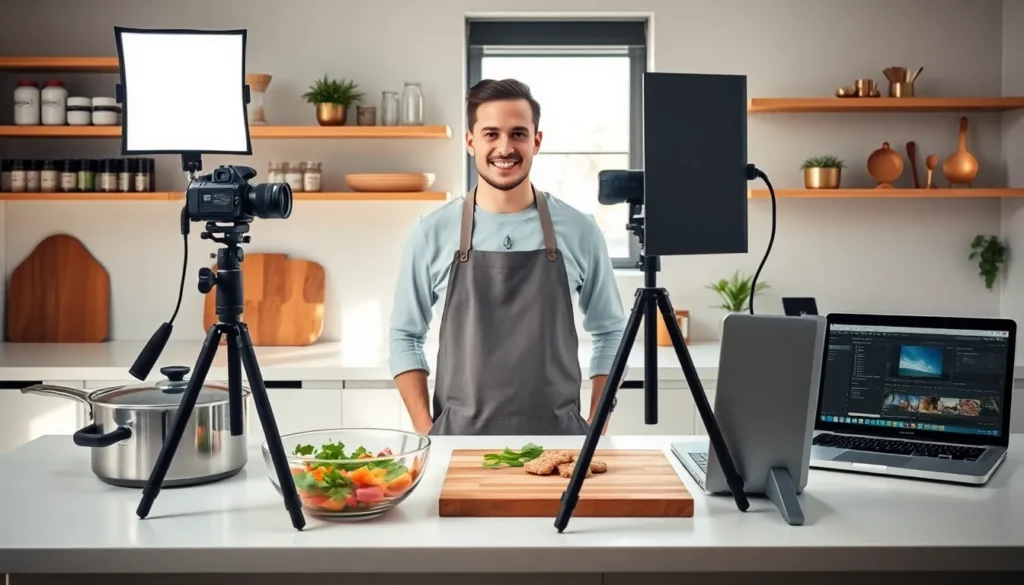
A camera alone isn’t enough. Creators need tripods for steady overhead shots and eye-level angles. Fluid head tripods allow smooth panning movements. Overhead rigs or articulating arms capture that classic top-down cooking view. Extra batteries and memory cards prevent interruptions during long recording sessions.
Investing in good cooking channels tools for video capture pays off immediately in viewer retention and perceived quality.
Audio Recording Essentials
Bad audio kills cooking videos faster than bad lighting. Viewers forgive visual imperfections, but they click away from muffled or echoey sound. Audio ranks among the most important cooking channels tools investments.
Lavalier Microphones
Lavalier mics clip onto clothing and capture clear voice recordings. The Rode Wireless GO II and DJI Mic systems work well for cooking videos. They let creators move freely around the kitchen while maintaining consistent audio levels.
Shotgun Microphones
Shotgun mics mount on cameras or boom poles. They capture directional audio and reduce background noise. The Rode VideoMic Pro+ and Sennheiser MKE 600 are industry standards. These mics work best when creators stay in a fixed position.
Audio Recorders
Dedicated audio recorders like the Zoom H5 or Tascam DR-40X capture higher-quality sound than in-camera audio. They provide backup recordings and more control over levels. Many creators sync external audio in post-production for the cleanest results.
Sound Treatment
Kitchens create audio challenges. Hard surfaces reflect sound and create echo. Acoustic panels, rugs, and soft furnishings reduce reverb. Some creators record voiceovers separately in treated spaces and add them during editing.
Lighting Setup for Food Videography
Lighting transforms ordinary food into mouth-watering content. Professional cooking channels tools for lighting make colors pop and textures visible. Poor lighting makes even delicious dishes look flat and unappetizing.
Natural Light
Window light remains free and beautiful. North-facing windows provide soft, consistent illumination. Creators can diffuse harsh sunlight with white curtains or reflectors. The downside? Natural light changes throughout the day and disappears entirely at night.
LED Panel Lights
LED panels give creators control over their lighting environment. Popular options include:
- Aperture MC Series: Small, versatile, app-controlled
- Godox SL Series: Affordable, powerful output
- Aputure 300d Mark II: Professional quality, excellent color accuracy
Two-light setups work for most cooking videos. A key light illuminates the main subject while a fill light softens shadows.
Softboxes and Diffusion
Direct light creates harsh shadows on food. Softboxes and diffusion panels spread light evenly. Larger light sources create softer shadows. A 24×36 inch softbox provides flattering illumination for most kitchen setups.
Reflectors and Bounce Cards
Reflectors redirect light into shadow areas. White foam boards cost a few dollars and bounce soft fill light onto dishes. Gold reflectors add warmth to food shots. These simple cooking channels tools make a significant visual difference.
Video Editing Software Options
Raw footage becomes a cooking video through editing. The right software depends on skill level, budget, and computer hardware. These cooking channels tools shape the final product viewers actually watch.
Professional Options
Adobe Premiere Pro dominates the professional market. It handles 4K footage smoothly, offers extensive color grading tools, and integrates with After Effects for motion graphics. Monthly subscription pricing makes it accessible, though the learning curve is steep.
DaVinci Resolve provides professional-grade editing for free. Its color correction tools surpass most competitors. The paid Studio version adds features like noise reduction and advanced audio processing. Many cooking creators prefer Resolve for its value.
Final Cut Pro works exclusively on Mac computers. It offers excellent performance, intuitive timeline editing, and one-time purchase pricing. Apple’s optimization means smooth playback even on older MacBooks.
Beginner-Friendly Options
CapCut has become surprisingly popular among food creators. It’s free, works on phones and desktops, and includes trendy templates. The mobile version lets creators edit on the go.
iMovie comes free with Apple devices. Basic editing, transitions, and titles work well for simple cooking videos. Creators often start here before graduating to Final Cut Pro.
Key Editing Features
Cooking videos benefit from specific editing capabilities:
- Speed ramping for time-lapses
- Color grading for appetizing food tones
- Text overlays for ingredient lists
- Music and sound effect libraries
- Multi-camera editing for different angles
Kitchen Equipment That Enhances Production Value
The kitchen itself becomes a set. Smart equipment choices improve both cooking efficiency and visual appeal. These cooking channels tools serve double duty.
Matching Cookware
Mismatched pots and pans look chaotic on camera. Uniform cookware in stainless steel, copper, or enameled cast iron creates visual cohesion. Le Creuset and Staub pieces photograph beautifully and last for years. Even budget-friendly matching sets improve production value.
Prep Bowls and Mise en Place Containers
Clear glass prep bowls showcase ingredients. Matching sets in various sizes keep shots organized. Viewers see exactly what goes into each dish. Stainless steel and white ceramic options also work well on camera.
Cutting Boards
Wooden cutting boards add warmth to shots. Large boards provide ample space for chopping sequences. White plastic boards create neutral backgrounds for certain ingredients. Many creators keep several options for different visual needs.
Appliances and Tools
Stand mixers, food processors, and quality knives appear frequently in cooking content. Brands like KitchenAid offer color options that match kitchen aesthetics. Sharp knives perform better on camera, dull blades crush rather than slice, and viewers notice.
Background Elements
Open shelving with organized spices, copper utensil holders, and wooden accessories create depth in shots. Plants add life to kitchen spaces. Many creators invest in decorative elements specifically for their video backgrounds.